
These steps are needed only if you plan to integrate DevOps Gadgets for Jira with your Bitbucket Cloud instance by adding a connection that is configured to use an authentication based on an OAuth client defined in Bitbucket (see Adding a new Bitbucket Cloud connection).
Bitbucket Cloud does not allow associating specific repositories to an OAuth client. This means that the Jira users using the DevOps Gadgets app configured with an OAuth client will be able to visualize data from all the repositories of the Bitbucket Cloud instance.
Follow these steps to add an OAuth client in your Bitbucket Cloud instance:
-
Log in to Bitbucket Cloud as an administrator.
-
Go to Settings > Workspace Settings > Apps and features > OAuth clients.
-
Click Create OAuth client. The Create OAuth client form will open.
-
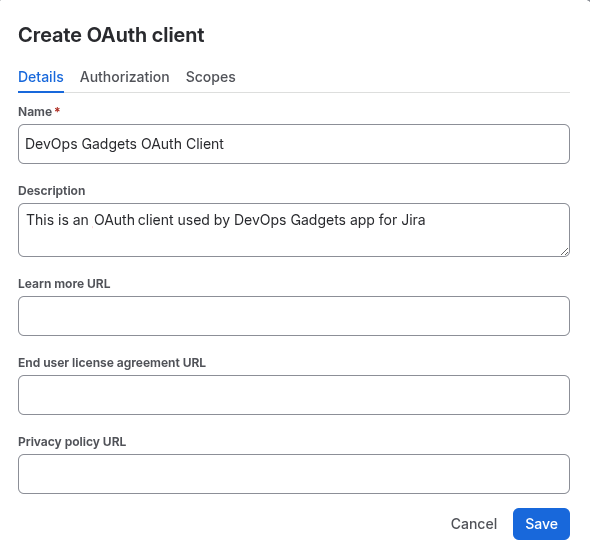
Enter a suggestive Name and Description for the new OAuth client.
-
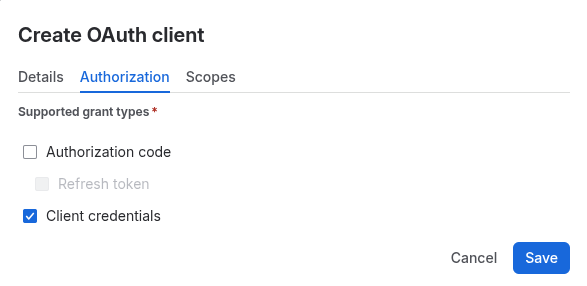
Go to Authorization tab and check Client credentials
-
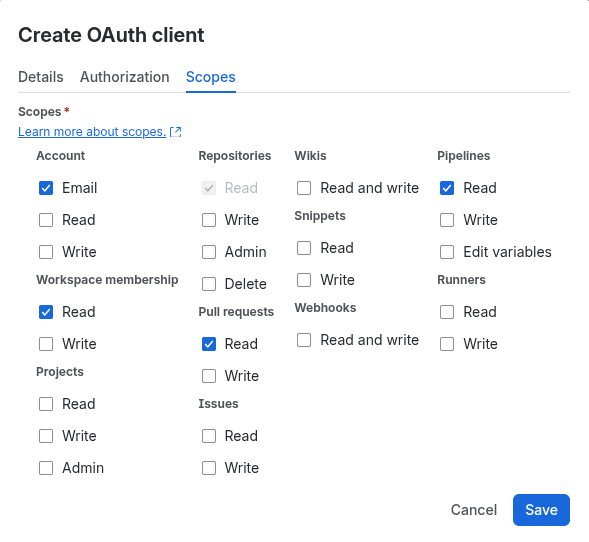
Go to Scopes tab and check select these Scopes:
-
-
Account: Email
-
Workspace membership: Read
-
Repositories: Read
-
Pull requests: Read
-
Pipelines: Read
-
-
Click Save. The new OAuth Client is added.
-
You can now copy its Client ID and Secret to use them for adding a new connection to your Bitbucket Cloud instance. See Adding a new Bitbucket Cloud connection.