
Rate limits
Great Gadgets is a reporting application that, by definition, works with a large amount of data, so it makes a considerable amount of calls to Jira to retrieve the necessary data. We recommend that you do not enable user rate limits in the Jira or Confluence environment where Great Gadgets is running, as this may slow down the performance of the gadgets in terms of load time and negatively affect the user experience.
But if you still want to set rate limits, note that Great Gadgets recognizes the specific error code thrown by Jira or Confluence when a rate limit is reached and, instead of getting an error outright, will retry up to 30 times at intervals of at least 1 second. If it still fails after these attempts, an error message will be displayed. So make sure you don't set the limit too low.
IP Allowlisting
If you want to use IP allowlists at the organisation level, to specify which IP addresses users must use to access content in Jira, please add the following IPs to your allowlists in order to allow Great Gadgets to communicate with Jira instance:
-
52.31.157.191
-
54.73.245.52
-
54.217.10.114
-
99.80.197.69
-
18.144.121.71
-
54.177.13.219
-
54.177.25.33
-
54.193.97.22
If these IPs are not added, the gadgets will return an error 403 (Forbidden):
Also, if users of Great Gadgets are behind a proxy or firewall, make sure it is configured to allow HTTPS traffic to the domain cloud.stonikbyte.com.
Additional settings for using macros in Confluence Data Center with SSO enabled
On Confluence Data Center with Single Sign-On (SSO), most of the app gadgets imported from Jira as external gadgets cannot be used in Confluence pages due to an error (401 - Unauthorized).

This happens when Jira is configured to use SSOSeraphAuthenticator, which means that in the seraph-config.xml file located in Jira's WEB-INF/classes directory has this line uncommented:
<authenticator class="com.atlassian.jira.security.login.SSOSeraphAuthenticator"/>
The Jira log file contains errors like this:
2022-08-18 11:43:27,047+0200 pool-task-service-1-thread-13 ERROR W92326 703x120394x1 8ifbei 172.23.254.214,172.23.254.11 /plugins/servlet/stonikbyte/greatgadgets/aws [c.s.c.b.services.tasks.Task] Error executing task with key: http://127.0.0.1:8080AgileBoards : Received http error code 401. Access to /rest/agile/1.0/board is not authorized. The id of this error is: 1382949090049972
com.stonikbyte.connect.base.rest.client.exceptions.HttpRequestUnauthorizedException: Received http error code 401. Access to /rest/agile/1.0/board is not authorized. The id of this error is: 1382949090049972
    at com.stonikbyte.connect.base.rest.client.BaseJiraRestServiceProvider.evaluateResponse(BaseJiraRestServiceProvider.java:180)
    at com.stonikbyte.connect.base.rest.client.BaseJiraRestServiceProvider.checkHttpResponseCode(BaseJiraRestServiceProvider.java:334)
    at com.stonikbyte.connect.server.rest.client.JiraServerRestServiceProvider.readServiceResponse(JiraServerRestServiceProvider.java:252)
    at com.stonikbyte.connect.server.rest.client.JiraServerRestServiceProvider.readPaginatedResponseInternal(JiraServerRestServiceProvider.java:115)
    at com.stonikbyte.connect.server.rest.client.JiraServerRestServiceProvider.readPaginatedResponse(JiraServerRestServiceProvider.java:58)
    at com.stonikbyte.great.gadgets.common.services.impl.JiraRestServiceImpl.getAllAgileBoards(JiraRestServiceImpl.java:1284)
    at com.stonikbyte.great.gadgets.common.tasks.TaskGetAllAgileBoards.execute(TaskGetAllAgileBoards.java:36)
    at com.stonikbyte.connect.base.services.tasks.Task.run(Task.java:203)
    at com.stonikbyte.connect.base.services.tasks.ManagedExecutorService$MonitoredTask.run(ManagedExecutorService.java:198)
    at java.base/java.util.concurrent.Executors$RunnableAdapter.call(Unknown Source)
    at java.base/java.util.concurrent.FutureTask.run(Unknown Source)
    at java.base/java.util.concurrent.ThreadPoolExecutor.runWorker(Unknown Source)
    at java.base/java.util.concurrent.ThreadPoolExecutor$Worker.run(Unknown Source)
    at java.base/java.lang.Thread.run(Unknown Source)
These errors occur due to the fact that the gadgets fail to connect to Jira for retrieving the necessary data. This happens because the SSO specific info is not passes to Jira along with the request made by Confluence.
The solution is to configure Jira to use JiraSeraphAuthenticator instead of SSOSeraphAuthenticator. Based on our tests, this change fixes the error and the user logon is not impacted.
This can be done by editing the seraph-config.xml file from Jira's WEB-INF/classes directory.
First, comment this line...
<authenticator class="com.atlassian.jira.security.login.SSOSeraphAuthenticator"/>
… then, uncomment this line
<authenticator class="com.atlassian.jira.security.login.JiraSeraphAuthenticator"/>
Save the file. Repeat this on all Jira nodes.
Search results limit when OpenSearch is enabled in Jira Data Center
By default, Jira data Center uses the built-in Lucene search engine for indexing and queries. Starting with newer versions (11.2+), OpenSearch is available as an optional feature, but it must be explicitly configured and connected to an external OpenSearch cluster.
If OpenSearch is enabled in your Jira Data Center instance, be aware that it introduces a maximum limit on search result retrieval. By default, this limit is set to 10,000 items. You can check the current value in Jira Administration > System Info, under the jira.search.platform.max.result.window parameter.

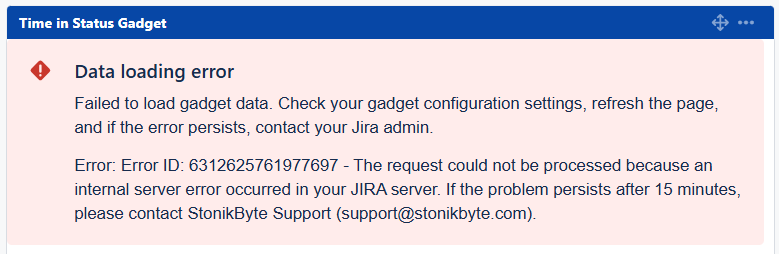
This limit can impact the functionality of app gadgets if they are configured with a data source that returns more than 10,000 Jira work items. In such cases, an error like the following may be displayed:
To resolve this error, increase the value of the jira.search.platform.max.result.window parameter to a higher limit.