
These steps are needed only if you plan to integrate DevOps Gadgets for Jira with your Bitbucket Cloud instance by adding a connection that is configured to use an authentication based on an OAuth consumer defined in Bitbucket (see Adding a new Bitbucket Cloud connection).
Bitbucket Cloud does not allow associating specific repositories to an OAuth consumer. This means that the Jira users using the DevOps Gadgets app configured with an OAuth consumer will be able to visualize data from all the repositories of the Bitbucket Cloud instance.
Follow these steps to add an OAuth consumer in your Bitbucket Cloud instance:
-
Log in to Bitbucket Cloud as an administrator.
-
Go to Settings > Workspace Settings > OAuth consumers.
-
Click Add consumer. The Add OAuth consumer form will open.
-
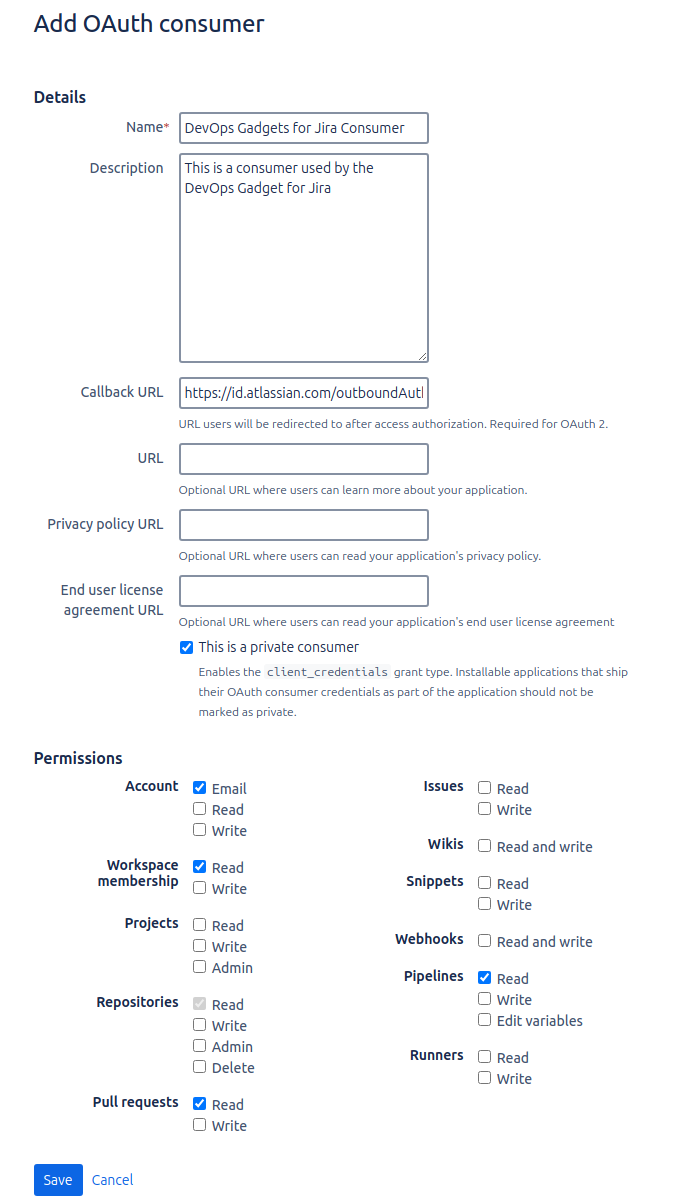
Enter a suggestive Name and Description for the new consumer.
-
At Callback URL enter this URL https://id.atlassian.com/outboundAuth/finish
-
Check the option This is a private consumer.
-
Set these Permissions:
-
Account: Email
-
Workspace membership: Read
-
Repositories: Read
-
Pull requests: Read
-
Pipelines: Read
-
-
Keep all the other fields unchanged.
-
Click Save. The new consumer is added.
-
You can now copy its Key and Secret to use them for adding a new connection to your Bitbucket Cloud instance. See Adding a new Bitbucket Cloud connection.